ElevenLabs TTS Operator
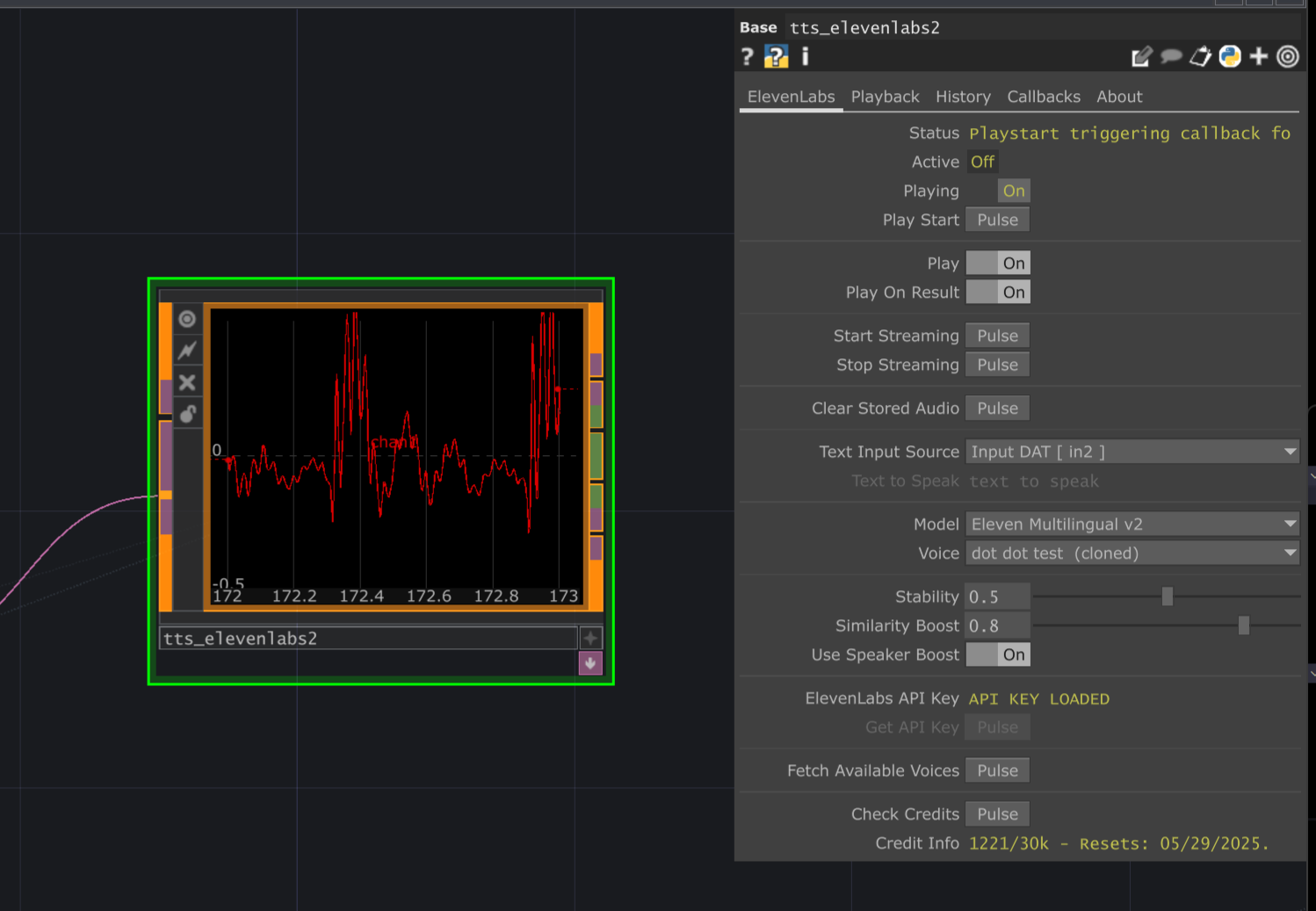
The ElevenLabs TTS LOP generates high-quality, natural-sounding speech from text using the ElevenLabs API. It utilizes WebSockets for low-latency audio streaming directly into a TouchDesigner CHOP, making it suitable for real-time applications. It also supports saving the generated audio to local files and recalling previously generated audio from ElevenLabs’ history or local cache.
Requirements
Section titled “Requirements”- Python Packages:
websockets: For streaming audio.requests: For fetching voices and history.numpy: For audio data handling.soundfile: For saving audio files (install viapip install soundfile).- Install these via the ChatTD Python Manager.
- ChatTD Operator: Required for dependency management, API key storage (optional), and asynchronous task execution. Ensure the
ChatTD Operatorparameter on the ‘About’ page points to your configured ChatTD instance. - ElevenLabs API Key: A valid API key from your ElevenLabs account.
Input/Output
Section titled “Input/Output”Inputs
Section titled “Inputs”- Input DAT (
input_message, optional): IfText Input Sourceis set toinput_dat, the text content of this DAT is used for synthesis.
Outputs
Section titled “Outputs”- Output CHOP (
null_audio_out->store_output): Contains the streamed or loaded audio data (mono, 24kHz). - History DAT (
history_dat): Internal table logging local generation jobs initiated by this operator. - API History DAT (
api_history_dat): Internal table mirroring recent history items fetched from the ElevenLabs API. - Local History DAT (
local_history_dat): Internal table listing locally saved audio files generated by this operator. - Voices DAT (
voices_dat): Internal table listing available voices fetched from the API. - Saved Audio Files: Audio can be saved locally (WAV or OGG) in the specified
Save Folder. - Saved Metadata Files: JSON files containing details about each saved generation are stored in a
metadatasubfolder within the ElevenLabs config directory.
Parameters
Section titled “Parameters”Page: ElevenLabs
Section titled “Page: ElevenLabs” ElevenLabs API Key (Apikey)
op('tts_elevenlabs').par.Apikey Str - Default:
None
Get API Key (Getapikey)
op('tts_elevenlabs').par.Getapikey Pulse - Default:
None
Fetch Available Voices (Getvoices)
op('tts_elevenlabs').par.Getvoices Pulse - Default:
None
Stability (Stability)
op('tts_elevenlabs').par.Stability Float - Default:
0- Range:
- 0 to 1
- Slider Range:
- 0 to 1
Similarity Boost (Similarityboost)
op('tts_elevenlabs').par.Similarityboost Float - Default:
0- Range:
- 0 to 1
- Slider Range:
- 0 to 1
Use Speaker Boost (Usespeakerboost)
op('tts_elevenlabs').par.Usespeakerboost Toggle - Default:
Off
Text to Speak (Text)
op('tts_elevenlabs').par.Text Str - Default:
None
Start Streaming (Stream)
op('tts_elevenlabs').par.Stream Pulse - Default:
None
Stop Streaming (Stop)
op('tts_elevenlabs').par.Stop Pulse - Default:
None
Clear Stored Audio (Clearaudio)
op('tts_elevenlabs').par.Clearaudio Pulse - Default:
None
Status (Status)
op('tts_elevenlabs').par.Status Str - Default:
None
Active (Active)
op('tts_elevenlabs').par.Active Toggle - Default:
None
Playing (Playing)
op('tts_elevenlabs').par.Playing Toggle - Default:
None
Start Playback (Playstart)
op('tts_elevenlabs').par.Playstart Pulse - Default:
None
Enable Playback Control (Play)
op('tts_elevenlabs').par.Play Toggle - Default:
Off
Play on Result (Playonresult)
op('tts_elevenlabs').par.Playonresult Toggle - Default:
Off
Check Credits (Checkcredits)
op('tts_elevenlabs').par.Checkcredits Pulse - Default:
None
Credit Info (Creditinfo)
op('tts_elevenlabs').par.Creditinfo Str - Default:
None
Page: Playback
Section titled “Page: Playback” Audio Device Settings Header
Active (Audioactive)
op('tts_elevenlabs').par.Audioactive Toggle - Default:
On
Volume (Volume)
op('tts_elevenlabs').par.Volume Float - Default:
1- Range:
- 0 to 1
- Slider Range:
- 0 to 1
Save Audio To File Header
Auto Save To Disk (Autosavetodisk)
op('tts_elevenlabs').par.Autosavetodisk Toggle - Default:
Off
Output Folder (Folder)
op('tts_elevenlabs').par.Folder Folder - Default:
"" (Empty String)
Base Name (Name)
op('tts_elevenlabs').par.Name Str - Default:
None
Auto Version (Autoversion)
op('tts_elevenlabs').par.Autoversion Toggle - Default:
On
Save Current Audio (Savefile)
op('tts_elevenlabs').par.Savefile Pulse - Default:
None
CHOP Outputs Header
Page: History
Section titled “Page: History” Update History (Fetchhistory)
op('tts_elevenlabs').par.Fetchhistory Pulse - Default:
None
Load Audio File (Loadfile)
op('tts_elevenlabs').par.Loadfile Pulse - Default:
None
Enable History Playback (Playbackfromhistory)
op('tts_elevenlabs').par.Playbackfromhistory Toggle - Default:
Off
Playing History Item (Playinghistory)
op('tts_elevenlabs').par.Playinghistory Toggle - Default:
None
Loaded Audio File Path (Audiofilepath)
op('tts_elevenlabs').par.Audiofilepath Str - Default:
None
Page: Callbacks
Section titled “Page: Callbacks” Callbacks Header
Callback DAT (Callbackdat)
op('tts_elevenlabs').par.Callbackdat DAT - Default:
ChatTD_callbacks
Create Callbacks (Createcallbacks)
op('tts_elevenlabs').par.Createcallbacks Pulse - Default:
None
onGenerate (Ongenerate)
op('tts_elevenlabs').par.Ongenerate Toggle - Default:
Off
onDone (Ondone)
op('tts_elevenlabs').par.Ondone Toggle - Default:
Off
onPlayStart (Onplaystart)
op('tts_elevenlabs').par.Onplaystart Toggle - Default:
Off
onPlayEnd (Onplayend)
op('tts_elevenlabs').par.Onplayend Toggle - Default:
Off
onSave (Onsave)
op('tts_elevenlabs').par.Onsave Toggle - Default:
Off
Available Callbacks:
onGenerateonDoneonPlayStartonPlayEndonSave
Example Callback Structure:
def onGenerate(info):
# Called before streaming starts
# info: {'job_id', 'text', 'voice_id', 'model_id'}
print(f"Starting generation job: {info.get('job_id')}")

def onDone(info):
# Called when streaming finishes or errors
# info: {'job_id', 'status', 'message', 'duration', 'text', 'voice_id', 'model_id'}
print(f"Generation finished: {info.get('status')} ({info.get('duration')}s)")

def onPlayStart(info):
# Called when playback starts
# info: {'job_id', 'audio_duration', 'text'}
print(f"Playback started for job: {info.get('job_id')}")

def onPlayEnd(info):
# Called when playback ends
# info: {'job_id', 'audio_duration', 'text'}
print(f"Playback finished for job: {info.get('job_id')}")

def onSave(info):
# Called after audio is saved successfully
# info: {'job_id', 'filepath', 'filename', 'folder', 'duration', 'text'}
print(f"Audio saved to: {info.get('filepath')}")
Page: About
Section titled “Page: About” Bypass (Bypass)
op('tts_elevenlabs').par.Bypass Toggle - Default:
Off
Show Built-in Parameters (Showbuiltin)
op('tts_elevenlabs').par.Showbuiltin Toggle - Default:
Off
Version (Version)
op('tts_elevenlabs').par.Version Str - Default:
None
Last Updated (Lastupdated)
op('tts_elevenlabs').par.Lastupdated Str - Default:
None
Creator (Creator)
op('tts_elevenlabs').par.Creator Str - Default:
None
Website (Website)
op('tts_elevenlabs').par.Website Str - Default:
None
ChatTD Operator (Chattd)
op('tts_elevenlabs').par.Chattd OP - Default:
None
Clear Log (Clearlog)
op('tts_elevenlabs').par.Clearlog Pulse - Default:
None
Convert To Text (Converttotext)
op('tts_elevenlabs').par.Converttotext Toggle - Default:
Off
Usage Examples
Section titled “Usage Examples”Basic Streaming and Playback
Section titled “Basic Streaming and Playback”- Enter your ElevenLabs API Key.
- Pulse ‘Fetch Available Voices’ and select a voice from the ‘Voice’ menu.
- Select a desired ‘Model’.
- Keep ‘Text Input Source’ as ‘parameter’.
- Enter text in ‘Text to Speak’.
- Ensure ‘Play on Result’ is ON.
- Pulse ‘Start Streaming’. Audio should stream in and play automatically.
Streaming from Input DAT
Section titled “Streaming from Input DAT”- Set ‘Text Input Source’ to ‘input_dat’.
- Create a Text DAT and connect it to the first input of the ElevenLabs operator.
- Enter text into the Text DAT.
- Pulse ‘Start Streaming’.
Saving Audio Automatically
Section titled “Saving Audio Automatically”- Ensure ‘Auto Save To Disk’ is ON.
- Specify an ‘Output Folder’.
- Optionally change the ‘Base Name’ (use
$JOBIDfor uniqueness) and ‘File Type’. - Run streaming as usual (e.g., Pulse ‘Start Streaming’).
- After successful streaming, the audio and metadata files will appear in the specified folder.
Recalling and Playing History
Section titled “Recalling and Playing History”- Pulse ‘Update History’ to fetch recent items from the API and local storage.
- Select an item from the ‘Audio to Load’ menu.
- Pulse ‘Load Audio File’. Check ‘Status’ and ‘Loaded Audio File Path’.
- Enable ‘Enable History Playback’.
- Use the standard ‘Start Playback’ pulse to play the loaded audio.
Technical Notes
Section titled “Technical Notes”- Streaming: Uses WebSockets for low-latency audio delivery (PCM format, 24kHz sample rate).
- API Key: Stored securely in a local configuration file (
elevenlabs_config.json) within the ChatTD environment or project folder. - Dependencies: Requires
websockets,requests,numpy,soundfile. - Asynchronous: All API communication (streaming, voice fetch, history fetch, credit check) happens asynchronously via ChatTD to avoid blocking TouchDesigner.
- Saving: Audio saved locally requires the
soundfilelibrary. Metadata is saved in JSON format. - History: Fetches history from the ElevenLabs API (limited items) and scans local save folder for generated files.
- Playback: Uses an internal Audio Device Out CHOP configured via the Playback page parameters.
Related Operators
Section titled “Related Operators”- ChatTD: Provides core services like dependency management and asynchronous task execution.