Rating
The Rating LOP provides a standardized way to rate items within a TouchDesigner project. Each item is identified by a string and assigned a score between 0.0 and 1.0. Ratings are persisted to a JSON file on disk, making it easy to track preferences, evaluate generated content, or collect feedback over time. It can be used manually from the parameter panel or programmatically by AI agents through its exposed tools.
Agent Tool Integration
Section titled “Agent Tool Integration”This operator exposes 2 tools that allow Agent and Gemini Live LOPs to rate items and retrieve sorted ratings for AI-driven evaluation and quality assessment workflows.
Use the Tool Debugger operator to inspect exact tool definitions, schemas, and parameters.
When connected to an Agent LOP, the Rating LOP exposes two tools:
- rate_item — Assigns a numerical score (0.0 to 1.0) to an item. If Agent Selects Item is enabled on the GetTool page, the agent must provide the item name. Otherwise, it rates whatever is currently set in Item to Rate.
- get_ratings — Retrieves previously rated items from the ratings file. The agent can sort results by highest or lowest rated, and limit the number of results returned.
Using with an Agent
Section titled “Using with an Agent”-
Place a
ratingoperator in your network. -
Select your
agentoperator and go to its Tools page. -
Enable Use LOP Tools.
-
In the External Op Tools sequence, find an empty block and drag your
ratingoperator onto the OP parameter field.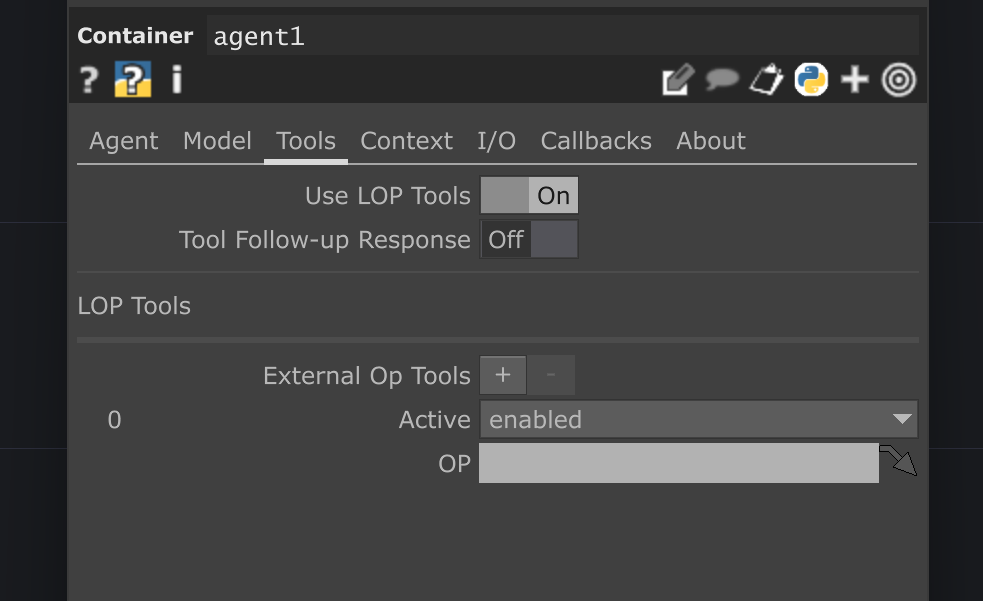 Drag / drop the Rating LOP here!
 -
Set the Mode for that tool block to
enabled. -
Instruct the agent in your prompt to use the rating tools when evaluating content.
Example prompt:
“You are an art critic. Analyze the provided image and rate it from 0.0 to 1.0 based on composition and color harmony. Use the rate_item tool to submit your rating.”
Configuring Agent Behavior
Section titled “Configuring Agent Behavior”On the GetTool page:
- Agent Selects Item — When enabled, the agent must specify which item to rate. When disabled, the agent rates whatever is currently in the Item to Rate field. This is useful when you want to control the item externally and let the agent only decide the score.
- Tool Info — Add contextual information that gets appended to tool descriptions. For example, “Rate on artistic quality only” gives the agent additional guidance.
Input/Output
Section titled “Input/Output”Inputs
Section titled “Inputs”None — items and ratings are configured via parameters or provided by agent tool calls.
Outputs
Section titled “Outputs”- ratings_table (DAT) — A table with
ratinganditemcolumns containing all ratings from the current file. This table updates automatically whenever a rating is written, undone, or the file path changes.
Usage Examples
Section titled “Usage Examples”Manual Rating
Section titled “Manual Rating”- On the Rating page, enter a name in the Item to Rate field (e.g., “render_v3”).
- Adjust the Rating slider to your desired score.
- Pulse Rate Item to save the rating to disk.
- The Last Rated Item and Output Display fields confirm the action.
Auto Rate Mode
Section titled “Auto Rate Mode”- Enter an item name in Item to Rate.
- Enable Auto Rate on Change.
- Every time you adjust the Rating slider, the rating is automatically saved — no need to pulse Rate Item.
Undoing a Rating
Section titled “Undoing a Rating”Pulse Undo Last Rating to reverse the most recent rating action. If the item was newly added, it is removed entirely. If it previously had a different score, that score is restored. Only the single most recent action can be undone.
File Storage
Section titled “File Storage”Ratings are saved as JSON files in a ratings_lop subfolder within the chosen base directory.
- Storage Location controls where ratings are saved. Set to Project Folder to use the current TouchDesigner project directory, or Custom Folder to specify a path manually in Rating Folder.
- Rating File sets the filename (without extension). The
.jsonextension is added automatically. - Last Rating File (read-only) shows the resolved path currently in use.
The operator handles backwards compatibility automatically: if a ratings file exists at an older location (without the ratings_lop subfolder), it reads from there and migrates the data to the new location on the next write.
Troubleshooting
Section titled “Troubleshooting”- “Error: Item is empty” — The Item to Rate field is blank. Enter a name before rating.
- Ratings not saving — Check that Storage Location is set correctly. If using Custom Folder, make sure Rating Folder points to a valid, writable directory.
- Agent cannot rate — Verify that Enable Tools is turned on in the GetTool page. If Agent Selects Item is off, make sure Item to Rate has a value so the agent has something to rate.
- Undo does nothing — Only the single most recent rating can be undone. If you have already undone once or no rating has been made this session, there is nothing to reverse.
Parameters
Section titled “Parameters”Rating
Section titled “Rating”op('rating').par.Item Str - Default:
"" (Empty String)
op('rating').par.Rating Float - Default:
0.0- Range:
- 0 to 1
- Slider Range:
- 0 to 1
op('rating').par.Autorate Toggle - Default:
False
op('rating').par.Rateitem Pulse - Default:
False
op('rating').par.Ratingfolder Folder - Default:
"" (Empty String)
op('rating').par.Ratingfile Str - Default:
"" (Empty String)
op('rating').par.Lastratingfile Str - Default:
"" (Empty String)
op('rating').par.Lastrateditem Str - Default:
"" (Empty String)
op('rating').par.Outputdisplay Str - Default:
"" (Empty String)
op('rating').par.Undolastrating Pulse - Default:
False
GetTool
Section titled “GetTool”op('rating').par.Enabletools Toggle - Default:
False
op('rating').par.Toolinfo Str Optional additional information to include in the tool descriptions for the AI agent.
- Default:
"" (Empty String)
op('rating').par.Agentselectsitem Toggle If True, the agent must provide the item to rate. If False, the agent rates the item currently specified in the "Item to Rate" parameter.
- Default:
False
Changelog
Section titled “Changelog”v1.1.02025-07-18
- GetTool Integration: The operator is now fully
GetTool-enabled, allowing AI agents to programmatically rate items and retrieve rating data. - Upgraded Base Class: Inherits from
DotLOPUtilsto leverage advanced features for asynchronous operations and standardized tool creation. - New Agent Tools:
rate_item: Allows an agent to assign a rating (0.0-1.0) to an item. The tool can be configured to either require the agent to specify the item or to rate the item currently loaded in the operator's parameters.get_ratings: Allows an agent to retrieve a list of existing ratings, with options to sort the data (e.g., by highest or lowest rated) and limit the number of results.- New Parameters: Added a "Gettool" page with parameters to configure the agent tools:
Enabletools: Master toggle for all agent functionality.Agentselectsitem: Controls the behavior of therate_itemtool.Toolinfo: Allows for adding custom text to the tool's description for more specific agent instructions.- Refactored Logic: The internal
_write_ratingmethod has been refactored to be more modular and now serves both manual parameter changes and agent tool calls, returning a status dictionary. - TODO for
get_ratings: Added a placeholder to implement sorting bymost_recentandleast_recent, which will require adding timestamps to the rating data in a future update.
v1.0.02025-07-18
- Initial Release: Introduces the
ratingoperator. - Core Functionality: Allows rating of any item (identified by a string) with a 0-1 float value, rounded to 5 decimal places.
- File Storage: Saves and loads ratings to/from a JSON file.
- Supports saving to a dedicated
ratings_lopsubfolder within the project folder or a custom user-defined folder. - Includes silent, backwards-compatible migration from legacy file locations.
- Live Data Display: Features a
ratings_tableDAT that displays the contents of the currently selected ratings file in real-time, withratingdisplayed as the first column. - Operator Controls:
Rateitem: Pulse parameter to manually save a rating.Autorate: Toggle to automatically save a rating when the value changes.Undolastrating: Pulse parameter to undo the single last rating action.ResetOp: Pulse parameter to clear the operator's state (table, status parameters) without deleting the source file.- Status Parameters: Provides read-only parameters for
LastrateditemandLastratingfilefor quick reference.