File In Operator
The File In operator loads conversation data from various file formats (DAT, JSON, CSV, TSV, TXT) into its output DAT. It provides flexible options for specifying which file to load, including loading the latest file from a folder, loading based on date or agent name, or loading a specific file directly.
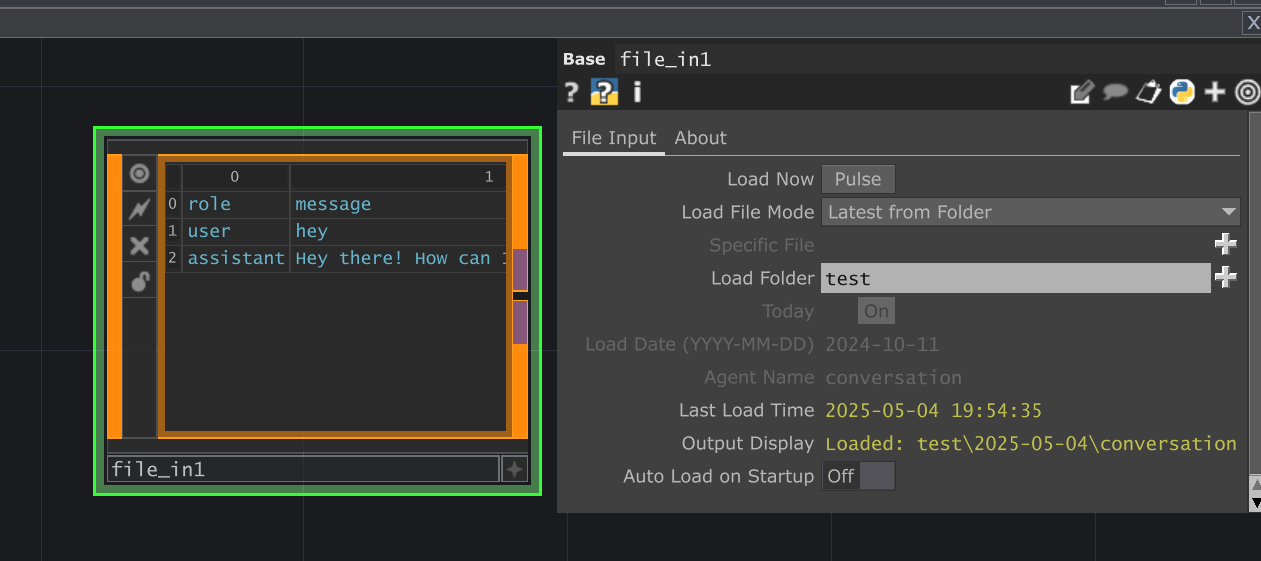 Placeholder - Add UI Image
Parameters
Section titled “Parameters”File Input Page
Section titled “File Input Page” Load Now (Loadpulse)
op('file_in').par.Loadpulse Pulse - Default:
None
Specific File (Specificfile)
op('file_in').par.Specificfile File - Default:
None
Load Folder (Loadfolder)
op('file_in').par.Loadfolder Folder - Default:
None
Today (Today)
op('file_in').par.Today Toggle - Default:
false
Load Date (YYYY-MM-DD) (Loaddate)
op('file_in').par.Loaddate Str - Default:
None
Agent Name (Agentname)
op('file_in').par.Agentname Str - Default:
None
Last Load Time (Lastload)
op('file_in').par.Lastload Str - Default:
None
Output Display (Outputdisplay)
op('file_in').par.Outputdisplay Str - Default:
None
Auto Load on Startup (Autoload)
op('file_in').par.Autoload Toggle - Default:
false
About Page
Section titled “About Page” Bypass (Bypass)
op('file_in').par.Bypass Toggle - Default:
false
Show Built-in Parameters (Showbuiltin)
op('file_in').par.Showbuiltin Toggle - Default:
false
Version (Version)
op('file_in').par.Version Str - Default:
None
Helper Popups (Popups)
op('file_in').par.Popups Toggle - Default:
true
Last Updated (Lastupdated)
op('file_in').par.Lastupdated Str - Default:
None
Creator (Creator)
op('file_in').par.Creator Str - Default:
None
Website (Website)
op('file_in').par.Website Str - Default:
None
ChatTD Operator (Chattd)
op('file_in').par.Chattd OP - Default:
None
Usage Examples
Section titled “Usage Examples”Loading the Most Recent Conversation Log
Section titled “Loading the Most Recent Conversation Log”- Set the
Load Folderparameter to the directory where your conversation logs are saved (e.g., theSave Folderused by aFile OutOP). - Set
Load File ModetoLatest. - Pulse
Load Now. The operator will find the newest file in the specified folder (and its subfolders) and load its contents into the output DAT.
Loading a Specific Day’s Log
Section titled “Loading a Specific Day’s Log”- Set the
Load Folderto the base directory containing dated subfolders (e.g.,.../logs/). - Set
Load File ModetoDate. - If you want today’s log, leave
TodayOn. If you want a specific past date, turnTodayOffand enter the date (e.g.,2023-10-27) intoLoad Date. - Pulse
Load Now. The operator will load the latest file found within the corresponding date subfolder (e.g.,.../logs/2023-10-27/).
Loading a Specific File
Section titled “Loading a Specific File”- Set
Load File ModetoFile. - Drag the desired file onto the
Specific Fileparameter or type/paste the path. - Pulse
Load Now.
Technical Notes
Section titled “Technical Notes”- The operator attempts to parse the loaded file based on its extension (
.dat,.json,.csv,.tsv,.txt). Ensure the file content matches the expected format for its extension. - Loading JSON expects a list of dictionaries, where each dictionary represents a row and keys represent column headers.
- Loading TXT assumes tab-separated values.